


From NFTevening Team By NFTevening Team
Managing crypto can feel overwhelming, especially with so many options and safety concerns. What if one wallet could handle it all – your tokens, NFTs, and even staking rewards? Our Phantom Wallet review dives deep into why this cryptocurrency wallet stands out in 2024. You’ll find everything you need to decide if it’s worth your investment. Stick around to explore its features, security, and usability.
Key Takeaways:
- Phantom Wallet is a secure crypto wallet supporting Solana, Ethereum, Bitcoin, and Polygon for managing assets and NFTs.
- The wallet features include multi-chain support, phishing protection, NFT tools, and staking rewards of up to 9% APY on Solana.
- It lets you buy crypto, stake tokens, and swap digital assets directly within the wallet app.
What is Phantom Wallet?
Phantom Wallet is a popular non-custodial wallet designed to make managing your digital assets easy and safe. It started in 2021 and quickly became one of the best wallets, especially for Solana users. In 2024, Phantom is even better because it supports multiple blockchains like Solana, Bitcoin, Ethereum, and Polygon.
This wallet is user-friendly and great for both beginners and experienced crypto enthusiasts. You can manage your tokens, NFTs, and even trade within the app. Phantom’s multichain feature is super handy because you don’t need to switch networks manually. Everything is in one place, making it simple to use.
It includes features like human-readable transaction details, phishing protection, and spam removal tools for NFTs. It’s backed by a strong code audit from Kudelski Security, which is a trusted firm. Plus, it offers a bug bounty program to keep hackers in check. All this means you can feel confident about the safety of your funds.
Another thing people love about Phantom is its staking feature. You can stake Solana (SOL) to earn rewards while helping to secure the network. For mobile users, the app is smooth and connects to popular Solana platforms like Jupiter and Tensor.
Pros
- Multichain support with Solana, Ethereum, and Polygon, making it versatile for various assets
- Simple design suitable for beginners and advanced users
- Lets users view, manage, and discover NFTs easily
- Includes phishing protection, human-readable transactions, and spam removal tools
- Allows staking SOL for rewards while contributing to network security
Cons
- While multichain, it’s still not compatible with all blockchains like the BNB smart chain
- Cannot connect with Ledger on Firefox web browser
Phantom Wallet Features
Multi-Chain Support
Phantom Wallet started as a Solana-exclusive wallet in 2021 but expanded to Ethereum and Polygon networks. Now, it’s a true multi-chain wallet, allowing users to manage tokens across all three blockchains without switching between multiple apps.
This means you can interact with decentralized apps (DApps) and manage your crypto in one unified interface. Phantom also preparing Bitcoin and BRC-20 tokens. This multi-chain flexibility is a game-changer for users who want access to DeFi apps, NFTs, and staking opportunities across different ecosystems without hassle.
NFT Storage
For NFT enthusiasts, Phantom goes beyond basic storage. The wallet offers a visually appealing gallery where you can display, manage, and even burn unwanted NFTs.
It supports all major NFT file formats, including videos and 3D models, and integrates with popular NFT marketplaces like Magic Eden and Solanart. You can even set your favorite NFTs as avatars for your wallet, making it personal and engaging.
Phantom ensures spam NFTs don’t clutter your collection. Its spam detection and removal tools, along with metadata insights (like floor prices and sales history), help users maintain an organized and valuable NFT collection.
Buy Crypto Easily with Credit Cards or Bank Transfers
Phantom makes buying crypto super simple. It connects with services like MoonPay and Coinbase Pay, which let you purchase popular cryptocurrencies like Solana (SOL), Ethereum (ETH), and Polygon (MATIC) straight from the wallet. You don’t need a separate app for this.
You can pay using a credit card, a debit card, or even a bank transfer. For example, if you want to buy Solana, just open the app, enter the amount, and make the payment. Your crypto gets added to your wallet within minutes. This feature is great for beginners who don’t know how to use top crypto exchanges like Binance or Bybit.
Swap Tokens Across Different Networks
Phantom Wallet also lets you trade tokens without needing to leave the app. With the built-in swap feature, you can exchange tokens across three major blockchains:
- Solana (SOL)
- Ethereum (ETH)
- Polygon (MATIC)
Phantom uses liquidity from decentralized exchanges (DEXs) to give you the best rates possible. For example, if you want to swap USDC for USDT, you’ll get the most tokens for your money because Phantom looks at all DEXs to find the best price.
The app charges a flat swap fee of 0.85%, which is super low compared to other cryptocurrency wallets. It also supports popular tokens like RAY and DAI, so you have lots of options to choose from.
Earn Rewards by Staking Solana
With Phantom, you can stake Solana (SOL) and earn up to 9% annual percentage yield (APY). This means your crypto can grow even when you’re not trading.
Staking is easy:
- Pick a validator from the app (a validator is like a node that helps keep the Solana network running).
- Delegate your SOL tokens to this validator.
Phantom also shows detailed stats for each validator, so you can choose the one with low fees and high rewards. Plus, your staked tokens stay in your wallet, so it’s super safe.
Ledger Hardware Wallet Integration
For users who prioritize security, Phantom integrates seamlessly with Ledger hardware wallets like Ledger Nano X and Ledger Nano S Plus. This setup ensures your private keys stay offline, significantly reducing hacking risks. You can connect your Ledger to Phantom on browsers like Chrome and Brave, although Firefox support is not yet available.
Setting up Ledger integration is straightforward, but it requires enabling settings like “Allow Blind Signing” on your device. This extra layer of security makes Phantom a preferred choice for users managing large portfolios or sensitive transactions.
Phantom Wallet Fees
Phantom Wallet does not charge fees directly for creating an account or storing crypto assets. However, the transactions and other activities within the wallet may involve third-party or blockchain-related charges.
When you make transactions on the Solana blockchain through Phantom, you pay a small network fee. This is necessary for processing and securing transactions. This fee is usually very low compared to other blockchains like Ethereum.
For instance, Solana network fees typically range around $0.0025 per transaction, making it an affordable option for users who perform frequent transactions. These fees go directly to the blockchain validators who confirm and secure the transactions.
Phantom’s in-app swapping feature is another convenient way to trade between tokens. When you use this feature, you pay a fee that includes the network fee and any associated costs from liquidity providers. The Phantom app charges a flat swap fee of 0.85%. The total cost depends on the liquidity pool and the tokens being swapped.
Phantom Wallet also supports swapping Ethereum-based tokens, and in this case, the gas fees for the Ethereum network apply. Ethereum gas fees can vary widely depending on the network’s congestion.
For example, during high demand, these fees can range from $10 to over $100 per transaction.
For buying crypto directly through Phantom using fiat (like USD), third-party providers such as MoonPay, Coinbase, or others handle the payment process.
These providers charge their own processing fees, which can vary based on the payment method you use (e.g., credit card, bank transfer) and your location. These fees are displayed transparently during the purchase process.
How to Install and Set Up Phantom Wallet
Extension
Here is a simple guide to help you get started with the Phantom Wallet extension for your browser.
Step 1: Downloading Phantom Extension
First, open your web browser. Then, go to the official Phantom website, phantom.app. This website is safe and always has the latest version. Choose your browser from the options, like Chrome, Firefox, or Edge.
Next, follow the instructions on the extension store. Click “Add to Browser” or a similar button to install the extension. After it’s done installing, Phantom will open in a new tab. If it doesn’t open, you can find it by clicking the little puzzle icon in the top-right of your browser, where all your extensions are listed. You can pin Phantom so it’s always easy to see.
Step 2: Setting Up Your Wallet for the First Time
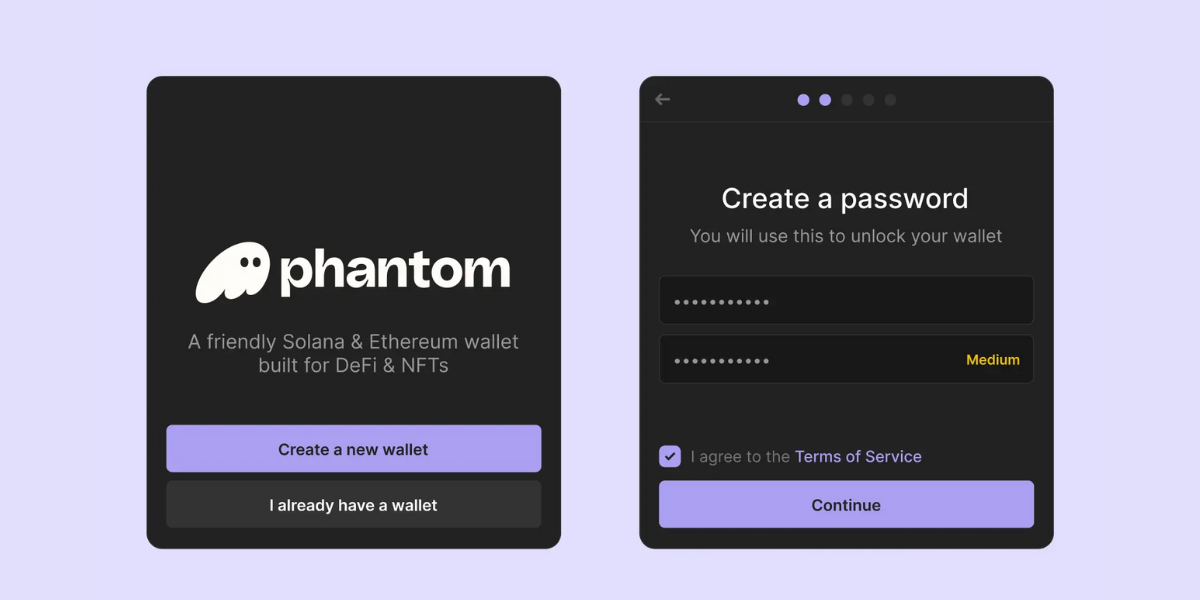
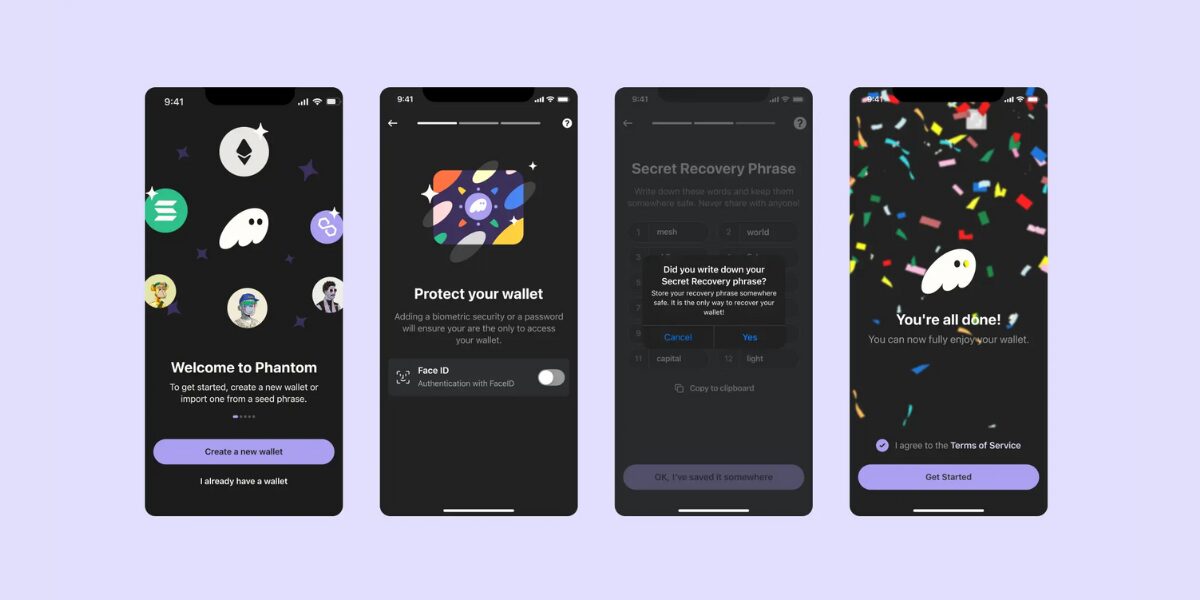
When Phantom opens, click on “Create New Wallet”. You’ll need to make a strong password. This password is for this browser only, so use something unique but easy for you to remember. Once you type your password, click “Continue”.
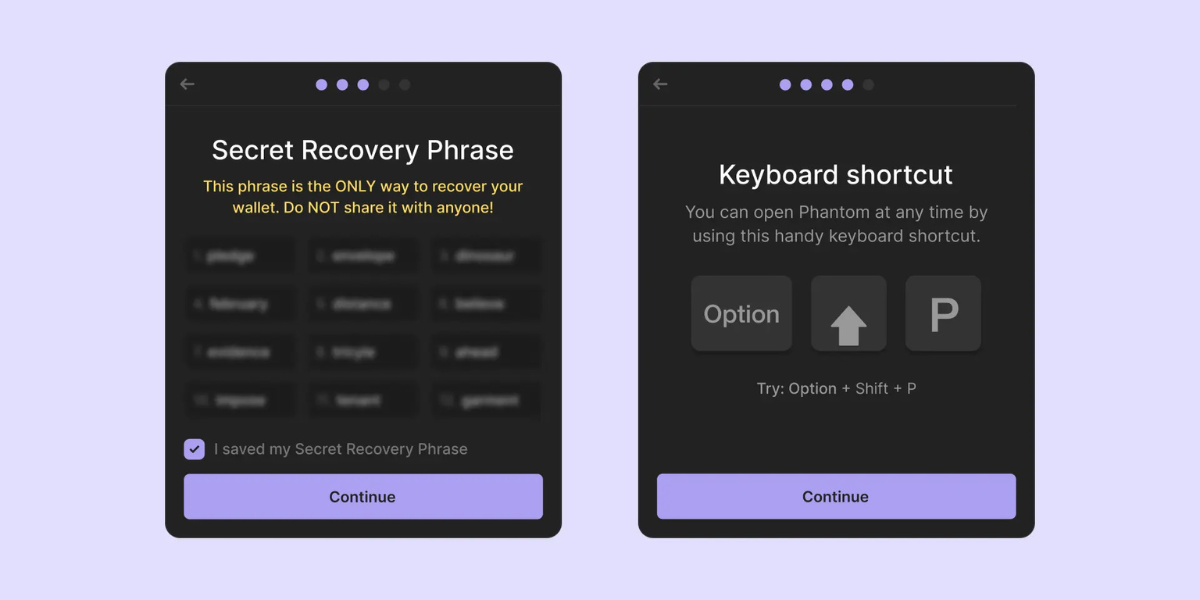
Now, Phantom will show you a very important thing called your Secret Recovery Phrase. This phrase has 12 random words and is like the key to your wallet. Write it down carefully and keep it safe.
Do not share it with anyone, not even Phantom support. If someone gets your phrase, they can take your money. After writing it down, click “Continue” again.
Step 2 (Re): If You Already Have a Wallet
If you already have a Phantom wallet, you don’t need to make a new one. Instead, click “I Already Have a Wallet”. Type your Secret Recovery Phrase to bring back your old wallet. Once you do this, Phantom will ask you to make a new password. This password is just for the browser you’re using now.
Mobile
Want to use Phantom Wallet on your phone? It’s super easy to set up. Whether you’re using an iPhone or Android, here’s how to get started.
Step 1: Downloading Phantom for Mobile
Go to the official Phantom website, phantom.app, on your phone. Click the link to your app store (App Store for iPhone or Google Play for Android). This way, you’ll make sure you download the real Phantom app.
Once you find it, tap “Install”. After it finishes, open the app. You’ll see the Phantom welcome screen.
Step 2: Creating a New Wallet on Mobile
If this is your first time using Phantom, tap “Create New Wallet”. Phantom will ask if you want to enable biometric security. This means you can unlock your wallet with your fingerprint or face. It’s a great feature, so we recommend turning it on. Next, Phantom will show you your Secret Recovery Phrase. Follow similar desktop version steps.
Phantom mobile also gives you handy notifications. Turn them on to see updates about your wallet, like when you get new crypto or NFTs. You can manage these alerts in Settings > Notifications anytime.
How to Swap and Buy Crypto on Phantom Wallet?
Here’s a step-by-step guide on how to swap and buy cryptocurrency, designed for both desktop and mobile Phantom Wallet users:
- Open Phantom Wallet: Start by opening your Phantom Wallet. On the desktop, ensure you have the browser extension installed and pinned for easy access. On mobile, launch the Phantom app from your device.
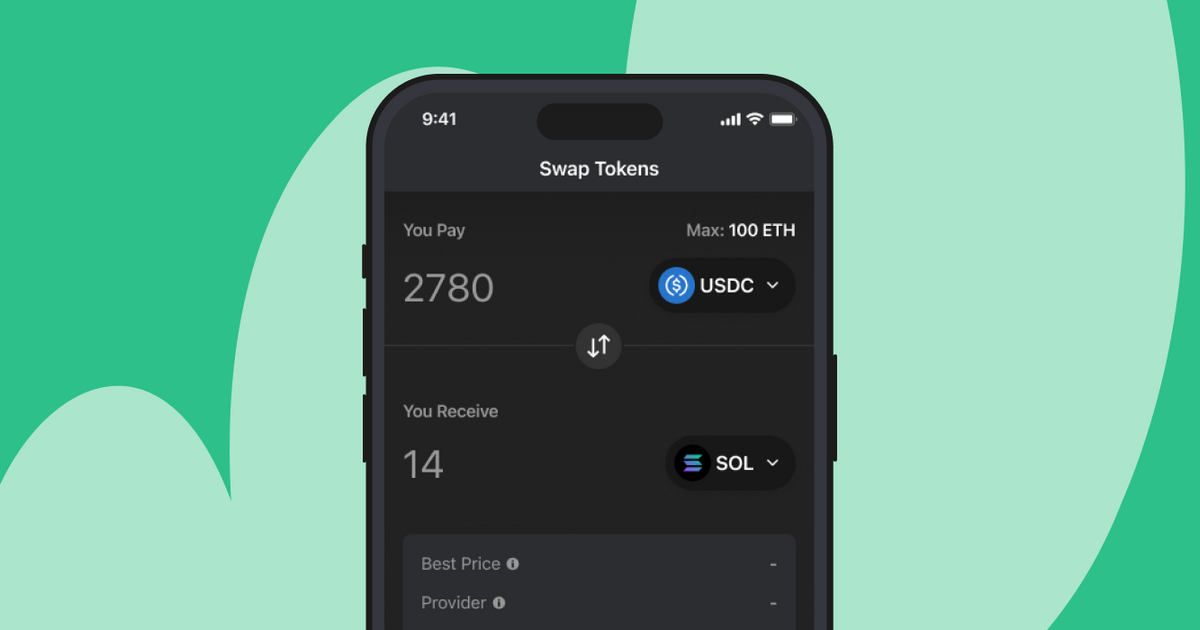
- Locate the Swap Feature: On the desktop, look for the Swap icon, which resembles a double-arrow symbol in the extension’s toolbar. On mobile, the Swap option is located at the bottom of the app screen.
- Choose the Tokens for Swap: Select the cryptocurrency you currently own and want to trade. Use the dropdown menu to pick your token (e.g., Solana or another supported token). Next, choose the token you want in return from the same dropdown list.
- Enter the Amount to Swap: Type in the quantity of the cryptocurrency you wish to swap. Phantom will display the estimated value of the new tokens you’ll receive and include any fees in the estimate.
- Review Transaction Details: Carefully check the exchange rate, fees, and total output of the transaction. Ensure all details are accurate to avoid errors.
- Confirm and Complete the Swap: Click the Confirm button to finalize your swap. The transaction will be processed on the blockchain, and the new tokens will appear in your wallet within a few moments.
Note: To buy crypto on Phantom, choose the cryptocurrency, Phantom supports payment services like MoonPay and Coinbase. Select your preferred provider and proceed. If you’re using the service for the first time, you might need to set up an account or log in.
Phantom Wallet Security Measures
- Scam Detection for Malicious Transactions: Phantom Wallet includes a robust scam detection system that analyzes transactions for signs of malicious activity. When you initiate a transaction, the wallet displays a clear summary, helping you understand exactly what you’re approving. If a transaction seems suspicious or originates from known scam sources, Phantom alerts you.
- Open-Source Blocklist for Phishing Protection: Phantom maintains an open-source blocklist, regularly updated with input from the community. This list identifies and blocks access to phishing websites and other malicious platforms. By integrating this blocklist, the wallet ensures users avoid accidentally interacting with fraudulent links, spam NFTs, or other harmful content.
- No Tracking of Personal Information: Phantom Wallet is built with privacy at its core. It does not collect or store any personally identifiable information (PII) about its users.
- Code Audits by Kudelski Security: The wallet’s code undergoes rigorous audits by Kudelski Security, a globally recognized leader in cybersecurity. This firm is trusted by top technology companies to identify vulnerabilities and enhance software resilience
- Bug Bounty Program for White-Hat Hackers: Phantom runs a bug bounty program that invites ethical hackers, also known as white-hat hackers, to test its systems for vulnerabilities. You can earn up to $50,000 in rewards.
Conclusion
In conclusion, Phantom Wallet offers a winning combination of features, security, and usability. Its multi-chain support, robust NFT capabilities, and user-friendly interface make it a strong contender in the crypto wallet space. Whether you’re staking SOL for rewards, showcasing NFTs, or simply holding assets, Phantom ensures a smooth and secure experience.
For users already invested in Solana, Ethereum, or Polygon ecosystems, Phantom is a no-brainer. Its rapid innovation and focus on security suggest it will continue to grow as a go-to wallet for Web3 users. If you’re considering upgrading your current wallet, Phantom is definitely worth a shot in 2024.
FAQs
Is Phantom Wallet safe to use?
Yes, Phantom is a secure wallet for managing your crypto and NFTs. It is a non-custodial wallet, meaning only you control your private keys and funds. The wallet implements several layers of security, including scam detection that flags suspicious transactions and malicious activity. Phantom also uses an open-source blocklist to protect users from phishing websites.
Plus, the wallet doesn’t collect any personal information, ensuring your privacy. It is regularly audited by Kudelski Security, a trusted software auditing firm. To further enhance safety, Phantom supports hardware wallets like Ledger Nano X, adding another layer of protection for your assets.
Its code is continuously improved based on feedback and contributions from the developer community. Over 7 million users worldwide trust Phantom for its strong security practices and reliable customer support team, which is available 24/7.
Which wallet is best for Solana?
Phantom Wallet is often regarded as the best wallet for Solana due to its seamless user experience and extensive features. It was originally built specifically for the Solana blockchain and has been refined over years of development.
Phantom makes it easy to store, swap, and stake Solana tokens while also managing Solana-based NFTs. The wallet’s integration with dApps (decentralized applications) on the Solana network is effortless, allowing users to explore various DeFi platforms and NFT marketplaces.
What are the available chains on Phantom?
Phantom Wallet supports four major blockchains: Solana, Ethereum, Bitcoin, and Polygon. This multichain functionality allows users to manage assets across these networks in one place without needing multiple wallets.
Is Phantom Wallet better than MetaMask?
Phantom stands out for its ease of use, focus on NFTs, and best-in-class features for Solana. If you primarily interact with the Solana blockchain, Phantom is the clear choice. It offers faster transaction speeds and lower fees compared to Ethereum-based transactions on MetaMask.
On the other hand, MetaMask is widely regarded as the go-to wallet for Ethereum and its ecosystem. It supports a broader range of Ethereum-based applications and tokens. However, Phantom has recently introduced Ethereum and Polygon support, making it a competitive option for users who engage with multiple chains.
Both wallets are secure and allow hardware wallet integration for added safety. Phantom is generally praised for its user-friendly interface and Solana NFT management capabilities, while MetaMask’s strength lies in its versatility across EVM-compatible chains like BNB smart chain, Aptos, Arbitrum, and more.
Disclaimer
NFTevening is an award-nominated media outlet that covers NFTs and the cryptocurrency industry. Opinions expressed on NFTevening are not investment advice. Before making any high-risk investments in cryptocurrency or digital assets, investors should conduct thorough research. Please be aware that any transfers and transactions are done at your own risk, and any losses incurred are entirely your responsibility. NFTevening does not endorse the purchase or sale of any cryptocurrencies or digital assets and is not an investment advisor. Additionally, please note that NFTevening participates in affiliate marketing.


All Comments