


Web3 is booming, and Arweave is becoming a popular infrastructure choice for developers. PermaDAO is a community where everyone can contribute to the Arweave ecosystem. It's a place to propose and tackle tasks related to Arweave, with the support and feedback of the entire community. Join PermaDAO and help shape Web3!
Author: Denzii @ Contributor of PermaDAO
Translator: Tree @ Contributor of PermaDAO
Reviewer: Xiaosong HU @ Contributor of PermaDAO
Adot AI is a Web3 search engine based on artificial intelligence technology. It features a vast data index and rich artificial intelligence components, empowering AI search with robust logical reasoning and knowledge integration capabilities. It provides users with real-time, intelligent, and professional decision support more conveniently. Currently, the Adot AI beta is now available, and the《Adot AI beta Launch 50 USDT Giveaway!》in cooperation with TaskOn platform is in full swing. If you are interested, please visit this article《Arweave ecological search engine Adot AI beta release, activity is in progress》to learn more about participation.
This article will take you through the testing process of Adot AI Beta and experience the various features of Adot AI. The official Adot AI propaganda video is also given. Interested friends can learn about it first.
1. Request an invitation code
Enter the Official Telegram Community of "Adot Official Community", leave a message to apply for the invitation code "invitation ode", and then the community administrator will send the invitation code to you. Please pay attention to a string of letters in the private message.
2. Log in to the Adot AI page
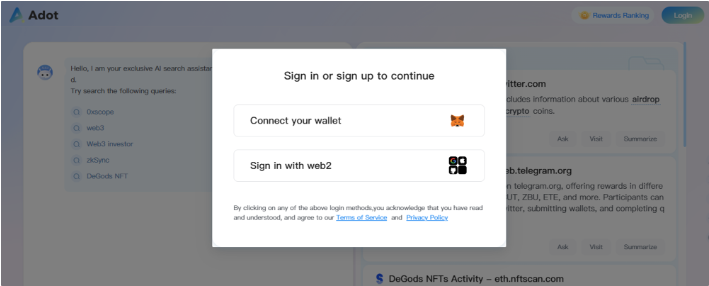
Open the test website, select "Connect your wallet" to connect the wallet, enter the invitation code, and click "Confirm" to log in successfully.
3. Page introduction
The entire Adot AI search page is divided into two parts: left and right. The bottom of the left is the search box, and the top is the small assistant reminder! On the right is the relevant information channel, which shows the current top relevant channel topics by default.
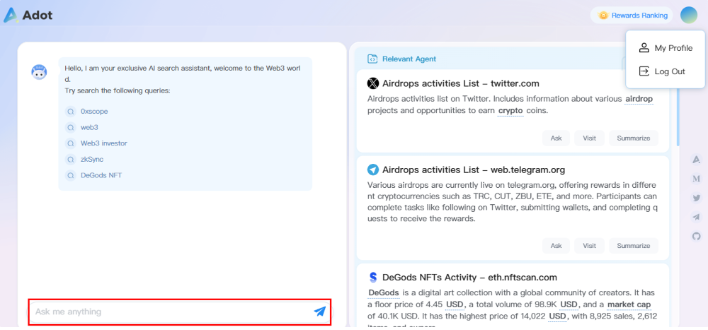
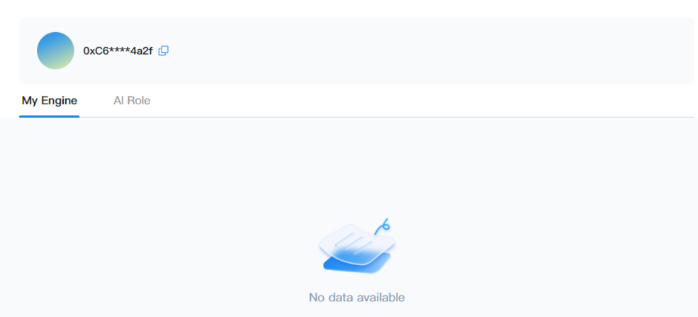
The top right corner of the page is the login after the personal information and login out button. Click "Log out" to log out of the account. Click "My Profile" to enter the personal information page, and you can see two columns: "My Engine" and "My Role".
- "My Engine": A view of the saved personal search engine. The official explanation is that the bar is for developers, not general users, and the bug will be fixed in a later version.
- "My Role": Personal account identity, users can customize. After setting, Adot AI will combine the user's different identity settings to intelligently tease out the data required by the user. At present, it supports two roles: KOL and News Reporter.
4. Search for questions
For example, if you want to know about Vitalik Buterin, you can enter "Vitalik" in the dialog box, and the relevant information about "Vitalik" will be displayed one by one on the right side of the page, and the left side is a simple summary of these contents.
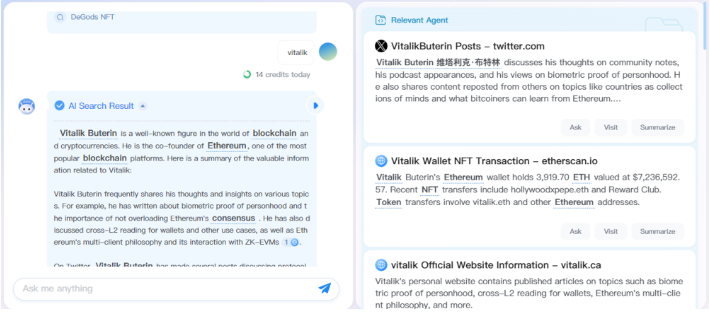
We can see that Adot collects information from Twitter, vitalic.ck, etherscan.io, Google, and other media or channels through the keyword "Vitalik". The effect is similar to the effect of using Google and other Web2 search functions. Amazingly, let's look at the last paragraph on the left:
Based on the information available, Vitalik Buterinis actively engaged in the cryptocurrency and blockchain space, sharing his thoughts and insights, and holding a significant amount of ETH in his wallet. His contributions to Ethereum and the wider blockchain community have been invaluable.
Adot went so far as to provide a summary of Vitalik: According to what is known, Vitalik Buterinis is active in the cryptocurrency and blockchain space, sharing his thoughts and insights, and holds a significant amount of ETH in his wallet. His contributions to Ethereum and the larger blockchain community are invaluable. This summary and evaluation are still very pertinent and concise, which is eye-catching.
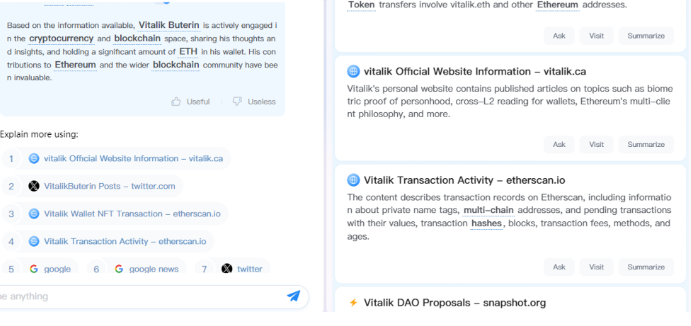
The right side shows a summary of the specific information that was searched, and below each message there are three buttons, "Ask", "Visit", and "Summerize", which we can test:
- "Ask": Continue to ask this message, for example: "Please refine Vitalik's Twitter content gist", further search and summary information will be given on the left;
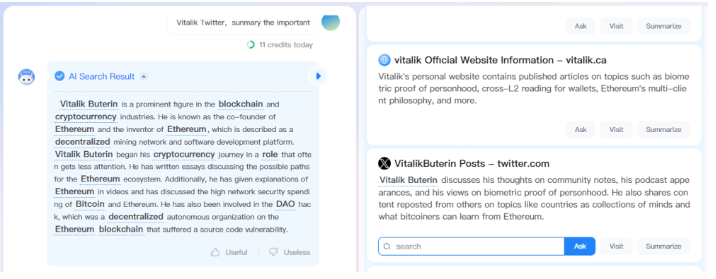
- "Visit": As the name suggests, click to open the original text for browsing;
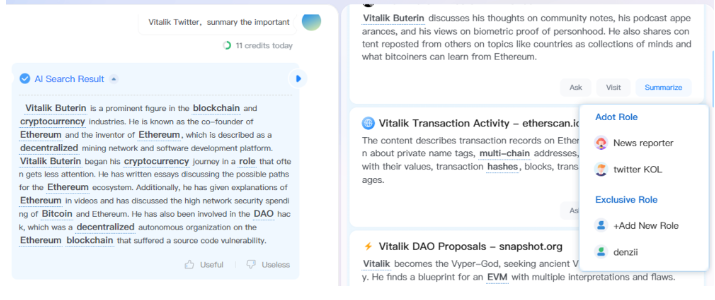
- "Summerize": Summarize this information. After clicking on it, we can summarize the content by AI according to different "Role" definitions, and form the format and content of news bulletins or KOL tweets, which is convenient for us to share the search results directly. This function is still really intelligent.
5. Reward ranking
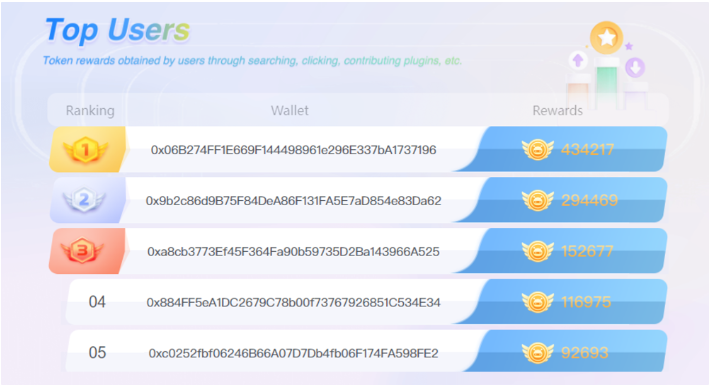
Click "Rewards Ranking" at the top right corner of the page to see the rewards ranking of Adot users, showing the top 20 points. Users are rewarded for searching or contributing using Adot. The official said that this part is a preset reward mechanism, to make data contributors, and search users rewarded accordingly, which may reserve the possibility of rewards for early supporters of the project, it is worth looking forward to.
6. Supplement
The above is a simple test and experience of the Adot AI Bate, along with we introduction of some features. Perhaps we also noticed that there are some differences between the interface we operate and the official video. The version of the interface in the official video is aimed at developers. The main difference between the version of the interface and the one we use as ordinary users is that the developer version can create their search engine. In addition, Adot AI Bate is still under test, and there may be some deficiencies or bugs. Welcome to give positive feedback.
In addition, this article does not introduce the features and technical implementation of Adot in detail. For more information on the introduction and use of Adot projects, please refer to 《【Arweave Asia Summer Hackathon】Lesson Eight: Unveiling Adot》in July 2023: In this event, Mr. Wei, the founder of Adot, introduced in detail what Adot is and its position in the Aeweave ecosystem. Finally, he demonstrated how to use Adot for related searches in detail.
Demonstration link: https://www.youtube.com/watch?v=qpgd5mog3EI
Finally, it should be noticed that if you do not have the invitation code "Invitation Code" of the Adot AI Bate version, you can also connect the wallet to log in to the webpage and only browse the entire function and layout of the application. But if you want to use Adot, when you enter text in the dialog box, the verification window of the invitation code will pop up. Otherwise, it can't be used. In fact, it is very easy to apply for the invitation code, you can directly enter the community message application.
Reference:
- Adot-Whitepaper
- 【Arweave Asia Summer Hackathon】Lesson Eight: Unveiling Adot
🔗 More about PermaDAO :Website | Twitter | Telegram | Discord | Medium | Youtube


All Comments